Hypothetical Document Embeddings (HyDE)
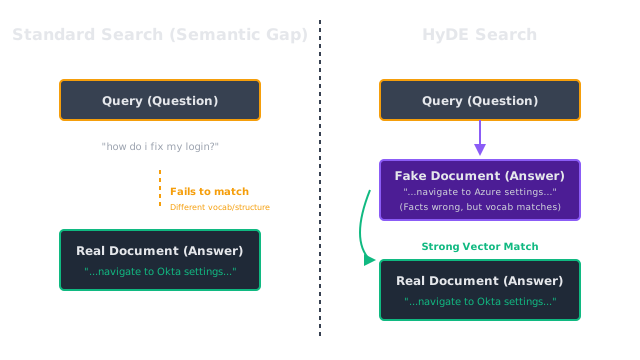
Instead of searching the database with a short, vague user query, HyDE asks an LLM to hallucinate a fake answer to the query, and searches the database using that fake answer.
Why Does This Exist?
Vector databases are incredibly literal mathematically. They measure the distance between two strings of text based on the semantic meaning of the words used in those strings.
This creates a structural problem in Retrieval-Augmented Generation (RAG): The user's question looks mathematically different than the document containing the answer.
If a user asks: "How do I reset my password?" (Short, interrogative, instructional intent). The document containing the answer looks like: "Navigate to the user settings panel. Click on the 'Security' tab. Enter your old password, then type your new password twice and click 'Save'." (Long, declarative, step-by-step).
Because the query and the document use different sentence structures and vocabulary, their embeddings might not land close to each other in the vector space, causing retrieval to fail. Hypothetical Document Embeddings (HyDE) is a brilliant, zero-shot technique to fix this semantic gap. It leverages the LLM's tendency to hallucinate as a feature, not a bug.
Think of It Like This
The police sketch artist
Imagine a witness (the user) sees a bank robber, but they can only provide a short, vague description: "He was tall with a scar on his cheek." (The User Query).
If you take that short sentence and try to match it against a database of millions of high-resolution mugshots (The Vector DB), the computer struggles. Text doesn't match photos well.
So, you bring in a sketch artist (the LLM). You tell the artist to draw a full-face portrait based only on that short sentence. The artist hallucinates a lot of details (hair color, eye shape) to fill in the gaps, creating a fake, hypothetical face (The Fake Document).
Now, you take that fake face and run it through the facial recognition database. Because a face matches a face much better than a sentence matches a face, the database successfully finds the real robber.
How It Actually Works
The HyDE pipeline consists of two distinct steps occurring before the standard RAG process begins.
1. Generation (The Hallucination)
When the user submits a query, it is not embedded. Instead, it is sent to an Instruction-tuned LLM (like GPT-4) with a very specific prompt.
Prompt: "You are an expert on our company's internal policies. Please write a short document answering the following question. If you do not know the answer, make up a plausible-sounding answer using standard corporate vocabulary. Question: {user_query}"
The LLM outputs a "Hypothetical Document." This document might contain completely fabricated facts, wrong numbers, or incorrect names. However, because it was generated by an LLM trained on billions of parameters, the structure, tone, and vocabulary of the fake document will closely resemble what a real document answering that question would look like.
2. Embedding and Retrieval
The system takes that hallucinated, fake document and passes it to the embedding model (e.g., text-embedding-3-small). The resulting vector is the "Hypothetical Document Embedding."
This vector is then used to search the vector database. Because the database is filled with real documents, and you are searching it using a fake document that shares the exact same semantic structure, the distance between the fake document and the real document is incredibly small.
The database returns the real document, and the standard RAG generation step proceeds using the real facts.
Code
Implementing HyDE is incredibly simple because it requires no fine-tuning or specialized models, just a standard LLM call before the vector search.
import openaifrom sentence_transformers import SentenceTransformerimport numpy as np
# Initialize embedding model (representing our vector database)embedder = SentenceTransformer('all-MiniLM-L6-v2')
# Simulating our vector DB with one specific target documentreal_doc = "To reset your corporate password, navigate to the Okta dashboard, click 'Security Settings', select 'Change Password', and authenticate using your Yubikey."real_doc_embedding = embedder.encode(real_doc)
user_query = "i locked myself out how do i fix my login?"
# 1. Generate the Hypothetical Documentprompt = f"""Write a short, authoritative corporate IT support document answering the following question. It is okay to guess the specific software names.Question: {user_query}"""
response = openai.chat.completions.create( model="gpt-4o-mini", messages=[{"role": "user", "content": prompt}], temperature=0.7 # Higher temperature is okay here to encourage plausible hallucination)
fake_document = response.choices[0].message.contentprint(f"--- Hallucinated Document ---\n{fake_document}\n")
# 2. Embed both the raw query and the fake documentquery_embedding = embedder.encode(user_query)hyde_embedding = embedder.encode(fake_document)
# 3. Compare the similaritiesdef cos_sim(a, b): return np.dot(a, b) / (np.linalg.norm(a) * np.linalg.norm(b))
standard_sim = cos_sim(query_embedding, real_doc_embedding)hyde_sim = cos_sim(hyde_embedding, real_doc_embedding)
print(f"Standard Query Similarity: {standard_sim:.3f}")print(f"HyDE Similarity: {hyde_sim:.3f}")
# -> --- Hallucinated Document ---# -> To resolve a locked login, users must access the IT Self-Service Portal. Click on "Account Recovery" # -> and verify your identity using Microsoft Authenticator. Once verified, you will be prompted to create # -> a new password. If the issue persists, call the helpdesk.## -> Standard Query Similarity: 0.312# -> HyDE Similarity: 0.584 (Massive improvement!)Note how the fake document mentioned "Microsoft Authenticator" while the real document required a "Yubikey". The facts were wrong, but the semantic overlap was so much stronger that it drastically improved the retrieval score.
Watch Out For
Increased Latency
HyDE requires a full text-generation LLM call before you can even begin searching your database. This adds significant latency to the user experience (often 1-2 seconds). To mitigate this, HyDE must be executed using small, highly optimized models (like Llama-3-8B or GPT-4o-mini). Do not use massive reasoning models to generate hypothetical documents.
Drifting entirely off-topic
If a user asks a highly ambiguous question, the LLM might hallucinate a document about a completely unrelated topic. For example, if the user asks "How do I deal with a python?", and they mean the programming language, but the LLM hallucinates a document about snake bite anti-venom, your search will retrieve documents about wildlife instead of code.
The Quick Version
- Queries (questions) and Documents (answers) look different mathematically, making vector search difficult.
- HyDE fixes this by using an LLM to hallucinate a fake document that answers the user's question.
- Even if the facts in the fake document are wrong, the vocabulary and structure will match the target document.
- The system embeds the fake document and uses it to search the database, resulting in much higher recall.